
aixsam.dev / tools / digital-human-koubo
Digital Human Koubo
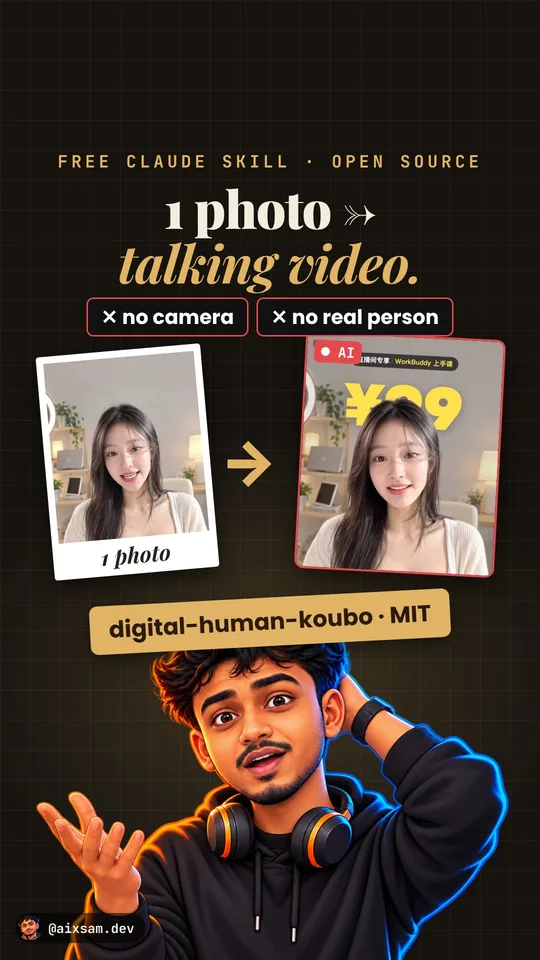
One photo + one sentence → a talking-head video, with no camera and no real person. This free Claude Code skill writes the script, makes an AI presenter talk, checks every clip against the script, cleans up the voice and edits it with captions. The skill is free and open source (MIT); the video generation runs on Renoise and costs credits.
What is Digital Human Koubo?
Digital Human Koubo is a free, open-source (MIT) agent skill by Berryxia (GitHub user andyhuo520) that turns one photo and one sentence into a finished talking-head video. "Koubo" (口播) is Chinese for a talk-to-camera video. It was built with Claude Code and also works with Codex and other agents that can load skills, connect an MCP server and run commands.
Your agent writes the script in segments of up to 15 seconds, generates each one as a lip-synced clip of a fixed AI presenter with Grok Video 1.5 on Renoise, checks every clip, evens out the voice across clips, and edits the video in Remotion with captions and YouTuber-style packaging. The skill is free; the clips cost Renoise credits.
The README's demo, a 27-second livestream ad with no real presenter, cost 482 credits from one sentence. Every demo is labelled as performed by an AI digital human.
What Digital Human Koubo can do
- Same presenter every time a fixed face, outfit and voice description in
persona.json, placed into any scene (studio, shop, classroom) before she talks. - Asks before it spends quotes segments, seconds, credits and your balance, waits for your yes, and makes segment 1 for you to check first.
- Checks its own clips whisper transcribes each clip and compares it with the script; 4 frames per clip are inspected and clips with burned-in subtitles are re-shot.
- One voice spectral matching, de-essing and a shared room sound make 30 separate clips sound like one recording.
- 5 edit styles, 48 packaging tricks measured frame by frame on 25 creator videos (MrBeast, MKBHD, Mark Rober, Vox, Kurzgesagt and more).
- Text behind the presenter big words or prices between the background and the person (needs a Mac).
- 6 languages tested English, Japanese, Korean, French, Spanish and Arabic.
What it costs
- The skill: free. Open source under MIT, no account needed for the skill itself.
- The video: paid credits on Renoise, the service that generates the talking clips (Grok Video 1.5). From the README's real runs: a 27-second livestream ad = 482 credits; 4–6 minute tutorials ≈ 3,250–3,400 credits.
- Prices at the time of writing: Grok Video 720p 17 credits/second, 480p 10 credits/second, one 2k image 23 credits. Check renoise.ai for what credits cost in your currency.
- It never spends without asking: the agent first shows segments · seconds · credits · balance and waits for your "yes", then makes segment 1 for you to check before the rest.
What you need
- Claude Code (tested by the author) or Codex: an agent that can load skills, connect an MCP server and run commands on your computer.
- A Renoise account with credits (renoise.ai). You log in in the browser; no API key to paste.
- ffmpeg, Python 3 (numpy, Pillow), Node.js 18+ and whisper.cpp on your computer, for downloading, checking and editing. Step 03 has every command.
- A Mac only if you want text behind the presenter; everything else works on Windows and Linux too.
- Your own photo (or one you have permission to use): front-facing, even light, hair off the face, mouth closed.
Setup, step by stepcopy each command with the button on the right
Get the code
In a terminal:
git clone https://github.com/andyhuo520/digital-human-koubo.git
cd digital-human-koubo
Copy the two skills into Claude Code
digital-human-koubois the main skill;finance-explainerpowers the long explainer style.mkdir -p ~/.claude/skills && cp -R skills/digital-human-koubo skills/finance-explainer ~/.claude/skills/Using Codex instead? Copy them to
~/.codex/skills/.
Make an account
Sign up at renoise.ai and add credits.
Add it to Claude Code
Open Claude Code and type these two lines one after the other:
/plugin marketplace add ArcoCodes/renoise-plugins-official/plugin install renoise@renoise-plugins-officialA browser window opens to log in. Codex:
codex mcp add renoise --url https://renoise.ai/api/public/mcpthencodex mcp login renoise.Check it worked
Ask Claude: "check my Renoise balance". If it shows your credits, you're connected.
Mac
brew install ffmpeg python node whisper-cpp && python3 -m pip install numpy pillowWindows
In PowerShell:
winget install Gyan.FFmpeg
winget install Python.Python.3.12
winget install OpenJS.NodeJS.LTS
Then
pip install numpy pillow, and get whisper-cli from the whisper.cpp releases.Linux
sudo apt install ffmpeg python3-numpy python3-pilNode 18+ with
nvm install --lts; build whisper.cpp from source.The whisper model
Download ggml-medium-q5_0.bin into a
modelsfolder in your home folder (~/models/). It's what checks every clip against the script.Check everything
This skips what you already have and tells you what's missing:
bash ~/.claude/skills/digital-human-koubo/scripts/doctor.shThen make the free sound effects and placeholder music (made by code, no copyright):
python3 ~/.claude/skills/digital-human-koubo/scripts/make_assets.py
Ask in plain words
In Claude Code, for example:
Use my digital human skill to make a 30-second ad for my course: 10 lessons, ₹999, was ₹4,999.Pick a style
It reads your content, suggests 2 of its 5 styles with preview images (finance explainer, influencer talking head with animated captions, launch breakdown, tutorial, multi-host) and asks everything once: style, ratio and length, caption intensity, presenter.
Approve the quote
It shows the credit cost and your balance. Say yes, check segment 1, then let it make the rest. It edits, adds captions and gives you the finished MP4.
Use your photo
The demos use the author's presenters. To use yourself, give Claude a front-facing photo of you and ask it to make a 4-view sheet (front, both sides, back; about 23 credits) so your face stays the same from every angle.
Save it as the presenter
It uploads the reference to Renoise and puts its
material:id intopersona.json. The ids already in the repo belong to the author's account and won't work on yours; that's expected.
Heads up: only use your own face and voice, or ones you have clear permission to use, and keep the "AI" label on your videos. Text behind the presenter needs a Mac and a medium shot (in a close-up your head hides the text). The demo videos in the repo are the author's own; don't re-upload them as yours.
Stuck?
Claude doesn't use the skill
Check the folders landed in ~/.claude/skills/digital-human-koubo and ~/.claude/skills/finance-explainer, restart Claude Code, and say "use my digital human skill" in your request.
Renoise doesn't connect
Ask "check my Renoise balance". If it fails, run the two /plugin lines again and finish the browser login. Latest instructions: renoise.ai/plugin.
doctor.sh says something is missing
Install what it lists with the commands in step 03 and run it again. For whisper, make sure the model file is in ~/models/, or point to it with export WHISPER_MODEL=/path/to/ggml-medium-q5_0.bin.
pip says "externally-managed-environment"
Newer Python installs block system-wide pip. Run python3 -m pip install --user --break-system-packages numpy pillow instead.
A clip has subtitles burned into the picture
That's a known Grok quirk. The skill checks 4 frames per clip and re-shoots those segments; let it.
The text behind me is hidden
In a close-up you fill most of the frame. Ask for that part as a medium shot; the skill warns when the person covers more than 60% of the picture.
Questions people ask
Is Digital Human Koubo free?
The skill is free and open source (MIT). The talking clips are generated on Renoise, which costs credits: the README's 27-second ad used 482 credits and 4–6 minute tutorials about 3,250–3,400.
Can I use my own face?
Yes: give your agent a front-facing photo of you, let it make a 4-view reference sheet (about 23 credits) and save it as the presenter. Only use your own face or one you have permission to use.
Does it work without Claude Code?
Codex works with the same scripts. Agents that can only chat and use MCP (like the Claude app) can plan, quote and generate the clips, but the editing steps need an agent that runs commands on your computer.
Does it work on Windows?
Yes, everything except text behind the presenter, which uses Apple Vision and needs a Mac.
Can I use my own voice?
The default is Grok's own voice, which lip-syncs best. The skill also supports Xiaomi MiMo TTS for a designed or cloned voice (clone only your own or one you have permission for); a swapped voice is about 100 ms off the lips.
Does it copy MrBeast's or MKBHD's videos?
No. It learned editing patterns (cuts, on-screen text, sound) by measuring 25 creator videos frame by frame. It never uses a real creator's face, voice, set or lines.
Still stuck?
DM me on Instagram with your system (Mac, Windows or Linux), a screenshot of the error and which step you're on.
DM @aixsamdev