
aixsam.dev / tools / FigCraft
FigCraft
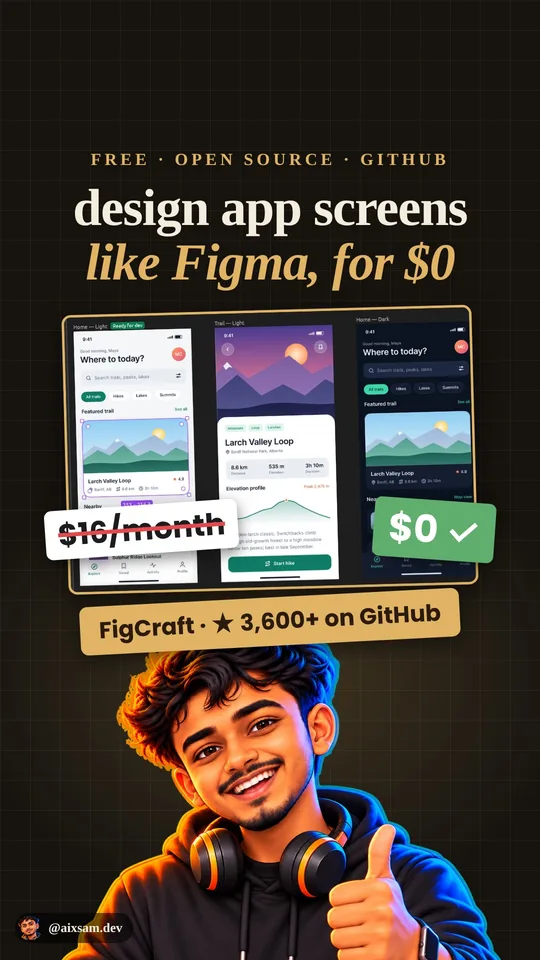
Design full app screens the way you would in Figma, for $0. Frames, auto layout, components and variants, clickable prototypes, and a Dev Mode that turns your design into React code. It runs on your computer, works offline, needs no account, and an AI agent can drive it for you over MCP.
What is FigCraft?
FigCraft is a free, open-source app for interface design and prototyping by the ArtCraft team, licensed MIT or Apache-2.0. If you know Figma you'll feel at home: frames, auto layout, components and variants, styles and variables, vector networks, prototypes and a Dev Mode for handing designs to developers.
It's a native app written from scratch in Rust, not a website in a wrapper, so it opens fast and works offline. Your designs are plain .figcraft files on your own disk, with no account and no telemetry. It's a clean-room rebuild from public documentation; it contains no Figma code and isn't made by Figma.
The part that stands out: every menu item, tool and drag is one of 400+ commands, and the same commands run from the app, the command line or an MCP server, so an AI agent like Claude Code can design screens for you. It's in alpha, about half way to replacing paid tools by its own estimate, and it reached 3,600+ GitHub stars in its first three weeks.
What FigCraft can do
- Auto layout in both directions, with wrap and grid, padding, gaps and Hug / Fill / Fixed sizing.
- Components and variants main components, instances with overrides, variant sets and an Assets panel.
- Prototypes connections, Smart Animate-style transitions, variables with if/else and a presentation view.
- Dev Mode measurements, annotations and code for the selected layer: CSS, HTML, React, Vue, SwiftUI or Compose.
- AI agents over MCP
figcraft-cli mcplets Claude Code or Cursor build and edit designs through the same commands you click. - Boards and live sessions a whiteboard file type with stickies and voting, and (in preview) editing one file together with cursors.
What you need
- A Mac (Intel or Apple Silicon), Windows (64-bit, 32-bit or ARM), or Linux (x86_64 or ARM). FreeBSD works too.
- Nothing else: no account, no sign-up, no internet once it's installed.
- Patience with an alpha: it works end to end, but expect rough edges (see heads up).
Setup, step by stepcopy each command with the button on the right
Mac
Open the latest release, download figcraft-x.y.z-macos-universal.dmg and drag FigCraft to Applications. It's signed and notarized, so it opens like any other app.
Windows
From the same latest release, download figcraft-x.y.z-windows-x64.msi (there are x86 and arm64 builds too) and run it. If Windows SmartScreen shows a warning, click More info → Run anyway.
Linux
Download the .deb, .rpm, AppImage or .flatpak for your system from the latest release. On Ubuntu, Debian or Mint:
sudo apt install ./figcraft-*-linux-x86_64.debWith an AppImage, make it executable and run it.
Or build it yourself
With Rust installed:
git clone https://github.com/storytold/figcraft
git clone https://github.com/storytold/craft-fonts craft-fonts
cd figcraft
cargo run --release -p figcraft
The second line gets the app's fonts; without them it falls back to your system fonts.
Start from a template
On the home screen open the Templates tab (or File → New from template…). There are eight: a mobile app, a landing page, a dashboard, a design system starter, a wireframe kit, social post sizes, slides and an icon set.
Design like you would in Figma
The toolbar, layers panel, Design panel and shortcuts sit where you'd expect. Make a frame, turn on auto layout, turn a button into a component and add variants, then wire screens together in the Prototype tab and press play.
Hand it to code
Switch to Dev Mode, select a layer and the Inspect panel shows its code: CSS, HTML, React, Vue, SwiftUI or Compose. Export any layer as PNG, JPG, WebP, SVG or PDF.
Open your Figma files (best effort)
FigCraft can open
.figfiles, but only best effort, so check them carefully. Your own files save as plain.figcraftfiles on your disk.
Start the MCP server
Every click, tool and drag in FigCraft is one of 400+ commands, and the same commands are open to AI agents. From the project folder (after building it yourself) or with the
figcraft-clifrom a release:figcraft-cli mcpTo let the agent work in the app you have open, attach it to the running app instead:
figcraft-cli mcp --attach 47800.Connect your agent
Add it as an MCP server in Claude Code, Cursor or any MCP client, then ask in plain words: "make a login screen with auto layout and a primary button component". The README's example designs were built entirely through these commands. The details are in docs/mcp.md.
How to remove it
Mac: drag FigCraft from Applications to the Trash. Windows: Settings → Apps → FigCraft → Uninstall. Linux: remove the package (sudo apt remove figcraft for the .deb) or delete the AppImage. Your .figcraft files stay where you saved them.
Heads up: FigCraft is in alpha. Its own README says it's "about 49% of the way to replacing proprietary tools for real work". The core editor works, but .fig files open only best effort and live collaboration is a first preview with no accounts or cloud. The browser version is a build you host yourself, not a website you just open. Sharing a file online uploads it, unencrypted, to the public server collab.craftapps.dev unless you run your own, so don't share confidential work that way. FigCraft is an independent, clean-room app by the ArtCraft team; it's not made by or connected to Figma.
Stuck?
The text looks different from the template screenshots
When you build from source without the craft-fonts folder next to figcraft, it uses your system fonts. Clone craft-fonts, run cargo clean -p figcraft-text once and build again.
My .fig file looks broken
Opening .fig files is best effort while FigCraft is in alpha. Designs exported from Figma's REST API as JSON open more reliably, prototypes and variables included. For anything important, keep working in the original too.
Something crashed or doesn't work
It's an alpha, so file an issue on GitHub or ask on the ArtCraft Discord. FigCraft is built so a bug fails one action, not your whole session, and undo works.
Questions people ask
Is FigCraft free?
Yes. It's open source under MIT or Apache-2.0, with no account, no paid plan and installers for every platform.
Is it the same as Figma?
No. It's an independent app that works in a familiar way, rebuilt from public documentation. It isn't made by Figma, and by its own estimate it's about 49% of the way to replacing paid design tools.
Can I open my Figma files?
It opens .fig files best effort, and designs exported as Figma REST API JSON with their prototypes and variables. Check imported files carefully while it's in alpha.
Does it work in the browser?
There's a WebAssembly build of the whole app, but you host it yourself; there's no public website to just open. For most people the desktop app is the easy way.
Can I work with my team?
Live sessions are a preview: share a file over your local network or through a server and edit together with cursors. There are no accounts yet, and the default public server stores shared files unencrypted, so run your own server for private work.
Which computers does it run on?
macOS (one universal build), Windows (x64, x86, arm64), Linux (deb, rpm, AppImage, Flatpak), FreeBSD, and a self-hosted web build.
Still stuck?
DM me on Instagram with your system (Mac, Windows or Linux), a screenshot of the error and which step you're on.
DM @aixsamdev