
aixsam.dev / tools / net-merge
net-merge
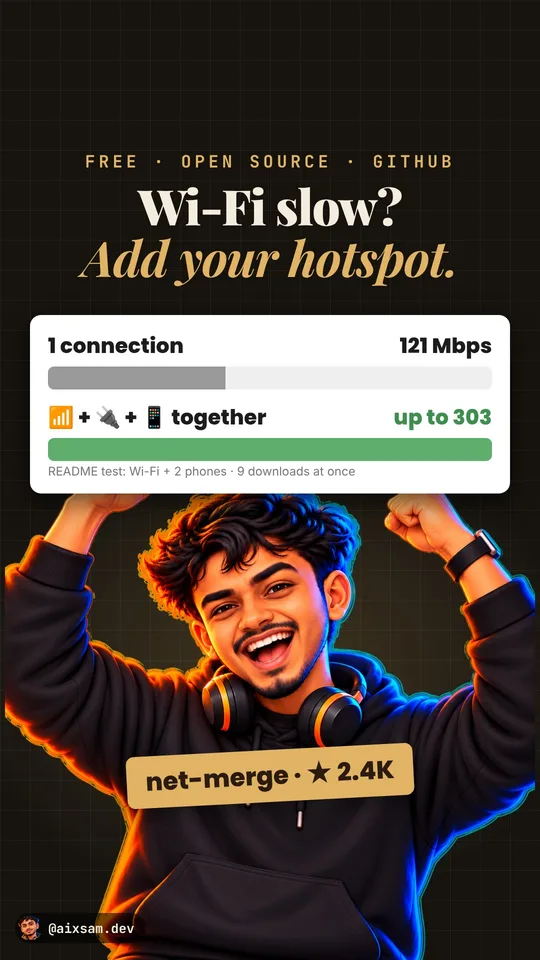
Slow Wi-Fi? net-merge uses your Wi-Fi and your phone's internet (hotspot or USB tethering) at the same time, so downloads that open many connections get faster. In the project's own test, the fastest single connection gave about 121 Mbit/s and three together gave 232–303 Mbit/s. Free, open source, MIT.
What is net-merge?
net-merge is a free, open-source (MIT) tool by GitHub user rohit267 that uses all your internet connections at once: Wi-Fi, Ethernet, mobile data and a phone's USB tethering or hotspot. It runs on Windows, macOS and Linux, with a beta app for Android. No account, no server and no VPN service.
It works per connection: every new connection an app opens goes to one of your links, faster links get more of them, and a link with no internet gets none. So apps that open many connections at once (Steam, browsers, updates, download managers) spread over all your links, while one single download stays on one link.
In the README's own test, with Wi-Fi + an Android USB tether + an iPhone hotspot and 9 downloads at once, it reached 232–303 Mbit/s, against about 121 Mbit/s for the fastest connection alone. It uses about 0.18 CPU cores per 100 Mbit/s, and if it crashes your internet keeps working.
What net-merge can do
- Use every link Wi-Fi, Ethernet, a second Wi-Fi, and a phone over USB tethering or Personal Hotspot, all at once.
- Work for every app TCP and UDP, IPv4 and IPv6, with no proxy to set up in each app.
- Balance by speed faster links get more connections; a link with no internet gets none until it works again.
- Pause by itself it waits when fewer than two connections work, and starts again when the second one comes back.
- Cap a connection limit one link (say, your phone) to 1–100 Mbit/s from the menu, or any speed with
net-merge limit. - Android too a beta app uses Wi-Fi and mobile data together, without root.
Will it make my internet faster?
- Yes for things that open many connections at once: Steam and game downloads, browsers, system updates, cloud uploads, download managers like IDM, and torrents.
- No for one single download over one connection. One connection always uses one link. (There's a browser tip below that splits big downloads.)
- Only if each connection reaches the internet by its own path: home Wi-Fi plus a phone on mobile data works. Wi-Fi and Ethernet on the same router don't help, they share one internet line.
- Not while a VPN app runs on your computer: it sends everything through itself, so there's nothing to share.
What you need
- A Windows, Mac or Linux computer you can install apps on (it needs admin rights once), or an Android 8.0+ phone for the Android app.
- Two internet connections: Wi-Fi plus a phone (USB tethering or hotspot), an Ethernet cable, or a second Wi-Fi.
- A data plan you can spare: part of your traffic goes through the phone's mobile data while net-merge runs.
- Mac with an Android phone only: the app TetherKit, because macOS can't use Android USB tethering by itself. iPhones need nothing extra.
Setup, step by stepcopy each command with the button on the right
Mac or Linux
Paste this into a terminal:
curl -fsSL https://raw.githubusercontent.com/rohit267/net-merge/main/install.sh | shOn Linux it uses your package manager (apt, dnf, zypper, apk or pacman), and on a Mac Homebrew if you have it, so net-merge updates with the rest of your system.
Windows
Paste this into PowerShell:
irm https://raw.githubusercontent.com/rohit267/net-merge/main/install.ps1 | iexAntivirus blocked it? Download net-merge-setup.exe and double-click it instead. The app isn't code-signed yet, so if Windows says "protected your PC", click More info → Run anyway.
Find the icon
A net-merge icon appears in the tray (Windows, Linux) or the menu bar (Mac). On Windows it may be hidden behind the ^ arrow next to the clock. If it isn't running, start it with:
net-merge tray
Windows or Linux
Plug the phone in with a USB cable and turn on USB tethering (Android) or Personal Hotspot (iPhone). That's all; net-merge adds it within a few seconds.
Mac with an iPhone
Plug the iPhone in and tap Trust if it asks. On the iPhone open Settings → Personal Hotspot and turn on Allow Others to Join. An iPhone USB network appears on the Mac and net-merge adds it.
Mac with an Android phone
Install and open TetherKit, plug the phone in, turn on USB tethering on the phone, then click Apply in TetherKit.
Start net-merge first, then connect the phone. macOS drops the TetherKit connection each time net-merge starts or quits; if it disappears, click Apply again.
Check it's merging
The icon is green when it's merging and grey when paused. Hover it to see each connection's speed and the total; open its menu (right-click, or click on a Mac) to see the connections, Pause merging and Quit.
With fewer than two working connections it pauses by itself (Paused: one connection) and starts again when the second one works.
Make browser downloads faster
A browser downloads a file over one connection. Chrome, Edge and Brave can split it: open this, set Parallel downloading to Enabled and click Relaunch.
chrome://flags/#enable-parallel-downloading(Edge:
edge://flags/#enable-parallel-downloading, Brave:brave://flags/#enable-parallel-downloading.) Firefox has no such setting; use a download manager likearia2c -x 8 -s 8 <link>. It only helps when the site allows downloading parts of a file, which most big download sites do.Start at sign-in (optional)
Tick Start at sign-in in its menu. On a Mac this needs this once:
sudo net-merge install
Install the app
On your phone download net-merge-android.apk and open it. If Android asks, allow your browser or file manager to install apps. It needs Android 8.0 or newer.
Turn it on
Open net-merge, tap the power button and tap OK on the VPN prompt. It then uses Wi-Fi and mobile data at the same time. Optional: add the net-merge tile to Quick Settings for one-tap on/off.
Android allows only one VPN app at a time, so it can't run next to another VPN, and mobile data stays on while it runs.
How to undo it
Your network goes back to normal as soon as net-merge stops. To quit it, use Quit in its menu or:
net-merge quitTo uninstall on Mac or Linux:
curl -fsSL https://raw.githubusercontent.com/rohit267/net-merge/main/install.sh | sh -s -- uninstallOn Windows: Settings → Apps → Installed apps → net-merge → Uninstall. On Android, uninstall the app like any other.
Heads up: your phone's mobile data gets used while net-merge runs, so watch your data pack. Some sites tie your login to one IP and may ask you to log in again. It does nothing while a VPN app runs on the computer (put the VPN on your router instead). The README also links RoutEngine and DormHost by the same author; those are separate products and not needed for any of this.
Stuck?
It's not any faster
Both connections must reach the internet by their own path (home Wi-Fi + phone data). Two links on the same router share one line. Also, one download over one connection stays on one link; try the browser tip above or a download manager. Run net-merge status to see how many connections each link carries.
My phone doesn't show up
Run net-merge list: it shows which connections are used and why others are skipped (for example "no default gateway"). On Windows, if the phone doesn't appear in Network Settings, install your phone maker's USB driver. On a Mac with an iPhone, if iPhone USB stays inactive in System Settings → Network, turn off its Disable unless needed switch.
Windows uses only one network
Windows can switch Wi-Fi off when Ethernet is plugged in. In gpedit.msc go to Computer Configuration → Administrative Templates → Network → Windows Connection Manager and set Minimize the number of simultaneous connections to the Internet or a Windows domain to Disabled.
Mac says it can't open net-merge
The app isn't code-signed yet. Run:
xattr -d com.apple.quarantine net-mergeI can't find the icon on Linux
Your desktop needs tray (StatusNotifierItem) support: KDE, XFCE, Cinnamon, LXQt and Budgie have it; on GNOME install the AppIndicator and KStatusNotifierItem Support extension.
Questions people ask
Is net-merge free?
Yes. It's open source under the MIT licence, with no account. The author also sells a separate upgraded app, RoutEngine; you don't need it for net-merge.
Will one big download get faster?
Not on its own: one connection always uses one link. Turn on parallel downloading in Chrome, Edge or Brave, or use a download manager, so the file is fetched over several connections.
Does Wi-Fi + Ethernet on the same router help?
No. Both go through the same internet line, so the total stays the same. You need connections with their own path, like home Wi-Fi plus a phone on mobile data.
Does it work with a VPN?
Not with a VPN app on the computer: the VPN sends everything through itself, so nothing gets shared. Set up the VPN on your routers instead. On Android it can't run next to another VPN app.
Will it use my mobile data?
Yes. When a phone is one of the links, part of your traffic goes over its mobile data. Quit net-merge when you don't want that, or cap the phone's speed from the menu.
Is it safe?
It needs admin rights once to add a virtual network adapter. When it stops (even after a crash) it removes its adapter and routes and your network goes back to normal. The apps aren't code-signed yet, so Windows and macOS warn on first launch.
Still stuck?
DM me on Instagram with your system (Windows, Mac, Linux or Android), your phone, a screenshot of the error and which step you're on.
DM @aixsamdev